
Artificial Intelligence
Edge Computing & AI for Real-Time Business Intelligence
Edge Computing & AI for Real-Time Business Intelligence Home Edge

Cloud Strategy Insight
Discover hidden costs of cloud migration that mid-sized businesses overlook. Learn to plan smarter, avoid budget overruns & ensure cloud ROI.
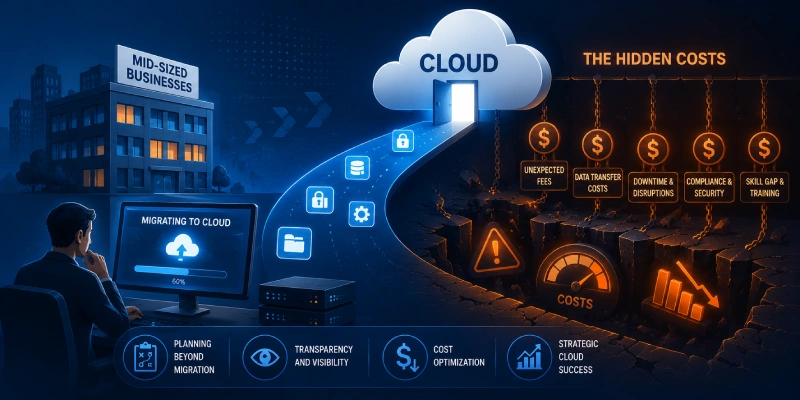
Cloud migration is one of the most important infrastructure decisions a business can make. Done right, it delivers real savings, better performance, and long-term flexibility. Done without full cost visibility, it becomes one of the most expensive surprises a business will face.
Most migration budgets cover the obvious - servers, storage, software licenses. What they rarely account for are the costs sitting just beneath the surface, quietly inflating the final bill.
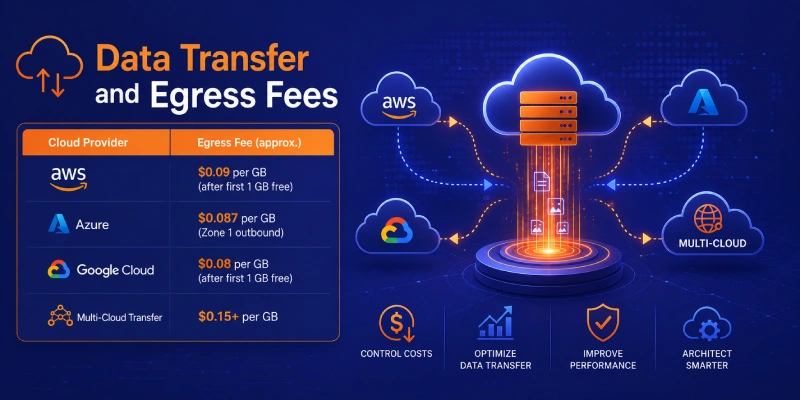
Every major cloud provider charges you when data leaves their network - this is called an egress fee. Uploading your data into the cloud is free. Getting it back out? Not so much.
For a company moving 50 TB of data and regularly syncing with on-premises systems or a second cloud provider, egress fees can easily run into thousands of dollars every month. These fees are real, ongoing, and rarely appear in vendor sales proposals.
| Cloud Provider | Egress Fee (approx.) |
|---|---|
| AWS | $0.09 per GB (after first 1 GB free) |
| Azure | $0.087 per GB (Zone 1 outbound) |
| Google Cloud | $0.08 per GB (after first 1 GB free) |
| Multi-Cloud Transfer | $0.15+ per GB |
Many business applications were built years ago to run on physical servers. Simply lifting them into the cloud as-is - known as a lift-and-shift migration - often results in poor performance and higher cloud bills than necessary.
Re-designing these applications to work properly in the cloud (using microservices, containers, or serverless architecture) takes skilled engineers and real time. For mid-sized businesses, this can easily run into hundreds of engineering hours that nobody budgeted for.
Common re-architecture tasks that catch businesses off-guard:
Cloud platforms are not plug-and-play. AWS alone has more than 200 services. Your team needs to know which ones to use, how to configure them securely, and how to troubleshoot when something goes wrong.
Training existing staff to cloud-certified level costs money and takes time. During the 3–6 months it typically takes to build cloud proficiency, projects slow down, mistakes happen more often, and support costs rise. If you need to hire experienced cloud engineers instead, expect to pay a significant salary premium.
| Certification | Estimated Cost per Person |
|---|---|
| AWS Solutions Architect (Associate) | $300 – $500 |
| Azure Administrator (AZ-104) | $280 – $450 |
| Google Cloud Professional | $200 – $400 |
| Cloud Security (CCSP) | $500 – $700+ |
Cloud providers make it very easy to adopt their proprietary services - managed databases, AI tools, serverless platforms. These services work brilliantly inside their ecosystem. The problem is that once you're deeply integrated, moving away becomes technically complex and very expensive.
Vendor lock-in is a hidden cost you pay slowly over time. It reduces your ability to negotiate pricing, limits your options if the provider raises fees, and creates technical debt that grows with every passing month.
Use Open-Source Tools
Use open-source tools like Kubernetes, Terraform, and PostgreSQL wherever possible
Build with Portability
Build with portability in mind - avoid proprietary APIs for core business functions
Negotiate Portability Terms
Negotiate data portability terms into your cloud contract before signing
Protection Strategy: Follow the three steps above to minimize your lock-in risk from day one.
Moving to the cloud expands your digital footprint - and with it, your compliance and security obligations. Businesses in regulated industries (healthcare, finance, retail) must ensure their cloud environment meets HIPAA, PCI DSS, GDPR, or other applicable standards. Achieving and maintaining that compliance requires tools, audits, and legal review that carry real costs.
Beyond compliance, cloud environments also require ongoing cost optimization. Without active management, businesses consistently waste 30–35% of their cloud spend on idle resources, over-provisioned instances, and forgotten services running 24/7 when they should be off.
$2.4M
avg. cost of a cloud breach
IBM Security 2024
63%
of breaches involve misconfiguration
Verizon DBIR 2024
40%+
underestimate compliance overhead
Deloitte Survey
The solution is not to avoid the cloud - it's to plan for the full picture. Here is a simple, proven framework to build a realistic cloud migration budget before you begin:
| # | Step | What to Do |
|---|---|---|
| 01 | TCO Baseline Audit | List every current IT cost: hardware, software licenses, support contracts, and staff time. This is your real comparison point against the cloud. |
| 02 | Data Flow Mapping | Document all data movement - volumes, frequency, source, and destination. Use this to accurately model egress and transfer fees over 12 months. |
| 03 | Application Portfolio Assessment | Classify each workload: lift-and-shift, re-platform, or re-architect. Assign realistic engineering estimates to each category before committing to a timeline. |
| 04 | Compliance & Security Gap Analysis | Identify your regulatory requirements and map them to cloud security controls. Budget explicitly for tools, audits, and legal review. |
| 05 | FinOps Governance Plan | Define your cost management approach before go-live: tagging policies, budget alerts, reserved capacity strategy, and a monthly optimization review. |
What is the average cost of cloud migration for a mid-sized business?
Costs typically range from $100,000 to over $1 million depending on the size and complexity of your IT environment, the number of applications being migrated, and how much re-architecture is required. Hidden costs such as egress fees, training, and compliance work routinely add 30–55% on top of initial estimates.
Why does cloud migration cost more than expected?
The most common reason is that vendors quote visible costs - compute, storage, licensing - while the real surprises come from egress fees, application re-work, staff upskilling, compliance gaps, and the ongoing cost of cloud waste from idle or over-provisioned resources.
How do I avoid vendor lock-in in the cloud?
Prioritize cloud-agnostic technologies such as Kubernetes, Terraform, and open-source databases. Avoid building core business functions on proprietary cloud APIs where a standard alternative exists. Also negotiate data portability clauses into your contracts from the start.
What are egress fees and why do they matter so much?
Egress fees are charges applied when data moves out of a cloud provider's network - to your on-premises systems, to another cloud, or to end users in some configurations. At $0.08–$0.15 per GB, they seem small but scale rapidly for businesses handling large data volumes daily.
What is FinOps and do I need it?
FinOps (Cloud Financial Operations) is the practice of actively managing and optimizing cloud spend through collaboration between engineering, finance, and operations teams. Any organization spending meaningfully on cloud infrastructure benefits from FinOps. Without it, industry data shows that businesses routinely waste 30–35% of their cloud budget.
Is cloud migration still worth it despite these hidden costs?
Yes - when planned properly. Cloud infrastructure delivers genuine advantages in scalability, reliability, speed of innovation, and global reach that are very difficult to replicate on-premises. The goal of understanding hidden costs is not to discourage migration, but to ensure businesses enter the process with accurate budgets and realistic expectations.
Stop guessing. Build a migration strategy with full cost visibility, from day one to go-live and beyond.
Start Planning Your Cloud Migration TodayEdge Computing & AI for Real-Time Business Intelligence Home Edge

Cybersecurity Mesh Architecture: Why Organizations Are Adopting It Home Cybersecurity

Hidden Costs of Cloud Migration for Mid-Sized Businesses Home Cloud